
Switching to FullRoster
Switching to FullRoster: we move your data for free.
Moving your data is usually the hardest part of changing software, so we do it for you, at no cost. Send us an export or a spreadsheet, and we'll bring over your members, families, levels and renewal dates. A typical move takes a few weeks, and nothing goes live until you've checked it.
Updated
How the move works
- Tell us what you use today. On a short call we look at your current system, how your memberships and dues work, and anything you keep in spreadsheets on the side.
- Send us an export. Export your contacts and memberships from your current system, or send the spreadsheet you keep. The instructions are the same whatever you use, and you can add a note about anything unusual.
- We set up your FullRoster. We create your membership levels, prices and renewal rules, and bring over your members, families, company memberships, lapsed members and renewal dates.
- You check it. You look through people, levels and renewal dates in FullRoster itself. Nothing goes live until you've said it's right.
- You connect your domain and branding. Add your logo and color, and the DNS records we give you, so member pages and emails come from your own domain.
- You launch. Go live when you are ready, and send members an announcement that you preview and edit first, so they hear about the change from you.
What comes over
| What | How it arrives |
|---|---|
| People | Every member, with their contact details and your custom fields, plus lapsed members, prospects and other contacts you want to keep |
| Families and companies | Household and company memberships stay grouped, with each person on their own record |
| Levels and dues | Your membership levels, what each one costs and how it renews |
| Renewal dates | Each member keeps their renewal date, so nobody is billed early or late |
What we need from you
- An export or spreadsheet of your contacts and memberships.
- Your levels and prices, if they aren't clear from the export, and how renewals work today.
- Your logo and color for member pages and emails.
- Access to your domain's DNS settings, or someone who has it, to add the records we give you.
- An hour or two to check the data before launch.
What it looks like after the move
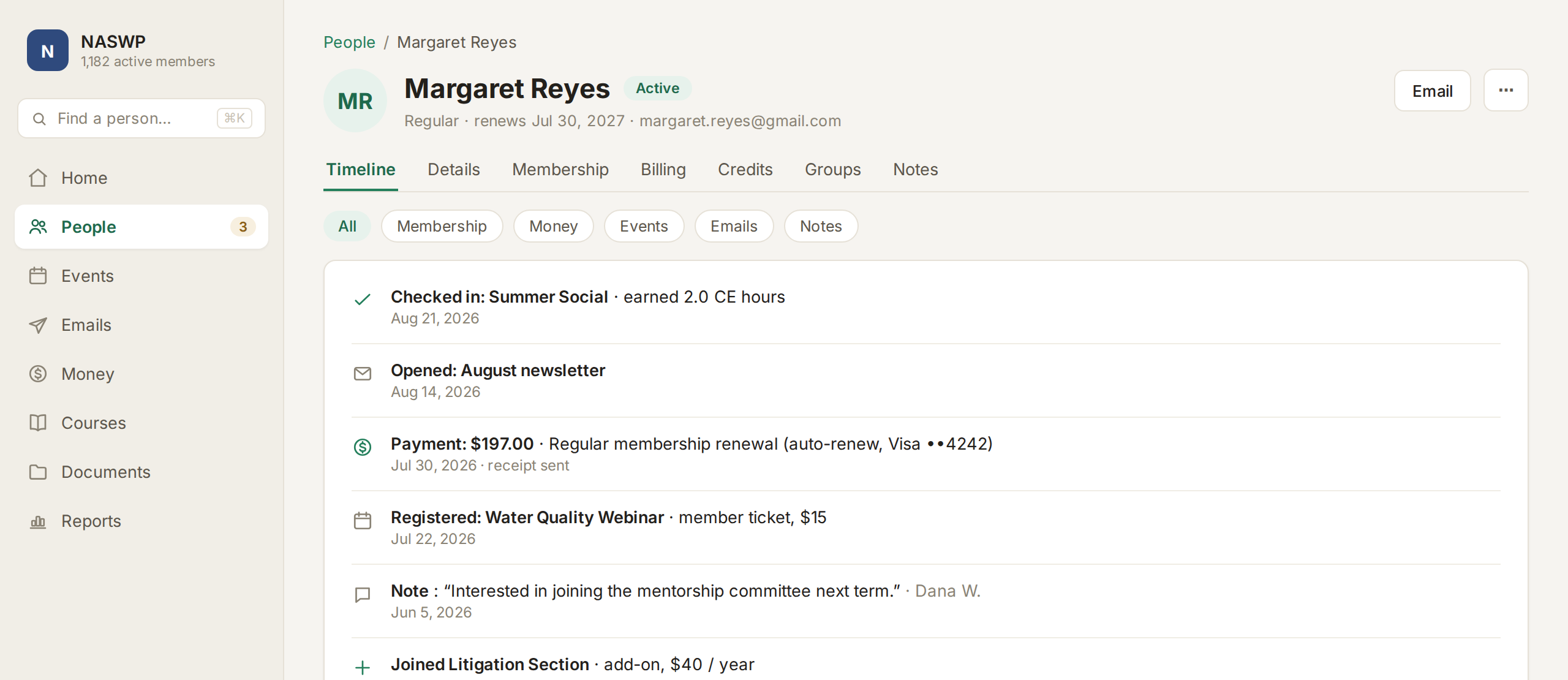
Everyone on one record from day one
After the move, each person has one record with their membership, events, emails and payments together, instead of copies spread across separate tools.
- Imports never create duplicates
- Each import is listed, and you can see who came in with it
- Custom fields come across as filters and columns
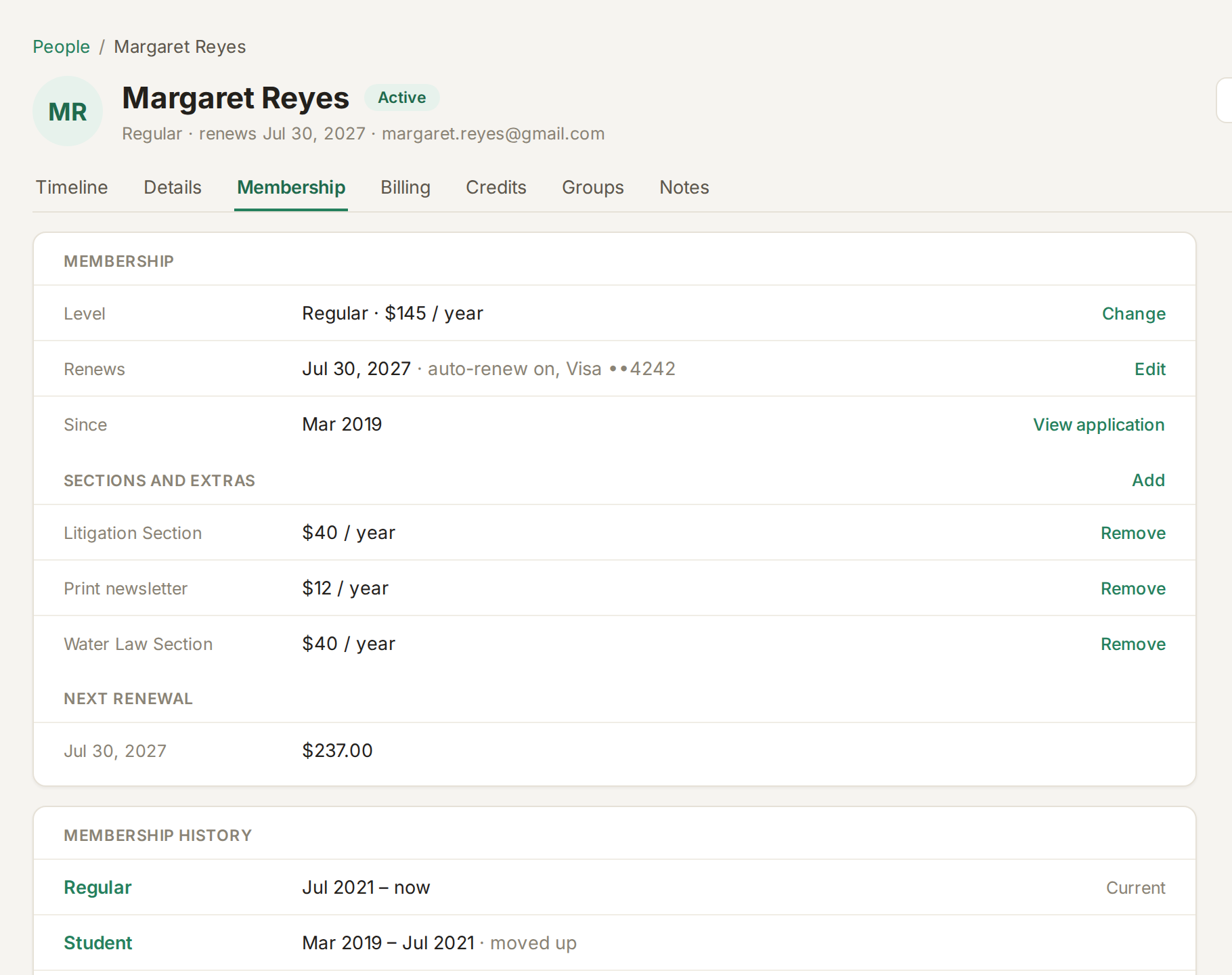
Renewals carry on without a gap
Members keep their renewal dates, and FullRoster takes over the reminders, invoices and automatic renewals from the day you launch.
- An editable reminder series before each renewal
- Automatic retries for failed cards
- A grace period before anyone lapses
What changes for your members
Very little. They renew, register for events, take courses and find documents in one member portal on your own domain, and they sign in with a link sent to their email instead of a password.
If you send the launch announcement, they hear about the change from you, in your words, with a link to the portal. After that, their renewal reminders and event emails come from FullRoster, sent from your own domain.
Still choosing? The best association management software compares eleven products, and if you're on Wild Apricot, Wild Apricot pricing, explained shows what you pay now.
Common questions
- What does the migration cost?
- Nothing. It's free on every plan, including the Free plan for up to 1,000 active members.
- How long does it take?
- A typical move takes a few weeks from your export to launch. Most of that time is you checking the data and choosing when to tell members.
- Which systems can you move us from?
- Any system that can export a spreadsheet, including Wild Apricot, MemberClicks, MembershipWorks and Join It, or a spreadsheet you keep yourself.
- Do members' saved cards carry over?
- It depends on how your current system stores cards. We'll tell you on the first call whether saved cards can come across, or whether members add a card the next time they renew.
- Do we need to clean up our list first?
- No. Only active members count toward your plan. Lapsed members, prospects and event guests are free and unlimited, so you can bring your whole history.
- Will members need new logins?
- No. Members sign in with a one-time link sent to their email, or with Google, so there is nothing for them to set up.
- Can our member pages use our own web address?
- Yes. Member pages and emails run on your own domain once you add the DNS records we give you. Your existing email records are never changed.
- When is the best time to switch?
- Any time works, because renewal dates come across as they are. A quiet month away from your biggest event or renewal season is usually easiest.
About FullRoster. FullRoster is association management software that's free for up to 1,000 active members. Members, dues, events, email, courses and payments in one place, and we move your data over for you. See how it works →
More guides
All guides →Ready to switch? We'll do the moving.
Book a demo and we'll look at what you use today. FullRoster is free for up to 1,000 active members.